DNS: The Internet's Phonebook
Introduction
This is the first blog post that I am making on my website, and I was thinking about what to write about. I wanted to write about something that is interesting and also something that is fundamental to the internet.
So I thought why not write about something that is fundamental to the internet and that is the Domain Name System (DNS).
Well to start off with why I am writing about DNS is because there was a major outage of Cloudflare’s DNS service on February 20, 2026, which caused a lot of websites to be inaccessible for a few hours. This made me realize how important DNS is for the functioning of the internet and I thought it would be a good topic to write about, and that I am also reading about it from the book “Computer Networking: A Top-Down Approach” by Kurose and Ross.
Another reason why I am writing about DNS is because I want to refer to this post in the future if I ever wanna revise about how DNS works or if I want to explain it to someone else. I think it will be a good reference for me in the future.
What is DNS?
So the way i see it is that DNS is like the phonebook of the internet. It translates human-readable domain names like www.google.com into IP addresses such as 142.251.152.119 (P.S: this is the IP address i found using ping www.google.com command) that computers use to identify each other on the network.
Basically it is like a giant hashmap that maps domain names to IP addresses
www.google.com -> 142.251.152.119
A good way to think of DNS is to imagine that you want to call your friend, but you don’t know their phone number. You would look up their name in the phonebook to find their phone number. Similarly, when you want to visit a website, your computer looks up the domain name in the DNS to find the corresponding IP address.
DNS is two things at once
-
A distributed database that stores the mappings of domain names to IP addresses.
-
A protocol that allows computers to query this database to find the IP address associated with a domain name. The DNS protocol works on top of UDP (User Datagram Protocol) and uses port 53 for communication.
Let’s take a look at how DNS works in more detail.
How DNS Works?
Well, the DNS is not just a single, massive server. If it were, the internet would crash the moment that server went down, and we don’t want that to happen.
Some of the reasons for not keeping a single server, even though it is simple are
-
Single Point of Failure: If that one server goes down, the entire internet effectively disappears for everyone.
-
Traffic Volume: A single server couldn’t possibly handle the billions of HTTP requests and emails generated every second.
-
Distant Centralized Database: A server in New York would create massive latency for a user here in India.
-
Maintenance: Keeping a single, massive database updated for every new host on earth would be an administrative nightmare
So what did we do?
We distributed it, of course. So DNS is a distributed, hierarchical database.
The structure looks like an inverted tree:
-
Root DNS Server There are 13 logical root servers (labeled A through M), managed by 12 different organizations and coordinated by IANA. In reality, these are implemented via over 1,000 physical server instances scattered globally to ensure redundancy. They don’t know the IP of
google.combut they do know where to find the servers for.com. -
Top Level Domain (TLD) Servers These servers handle the suffixes like
.com,.org,.netand country codes like.inor.usetc. -
Authoritative DNS Servers This is where like the actual mapping of
google.comto an IP address lives. If you own a website, this is where your DNS records are stored. You can maintain your own, or pay a service provider to host them for you. -
The “Local” DNS Server Though not strictly part of the hierarchy, your ISP (or your company/university) provides a Local DNS Server. This server acts as a proxy. When you make a request, your host sends the query to the local server, which then handles the “scavenger hunt” across the hierarchy on your behalf.
The IP address of this local server is typically provided to your host via DHCP when you first connect to the network. It is the one that is responsible for caching the DNS records that it has looked up in the past, so that it can respond faster to future requests for the same domain name.
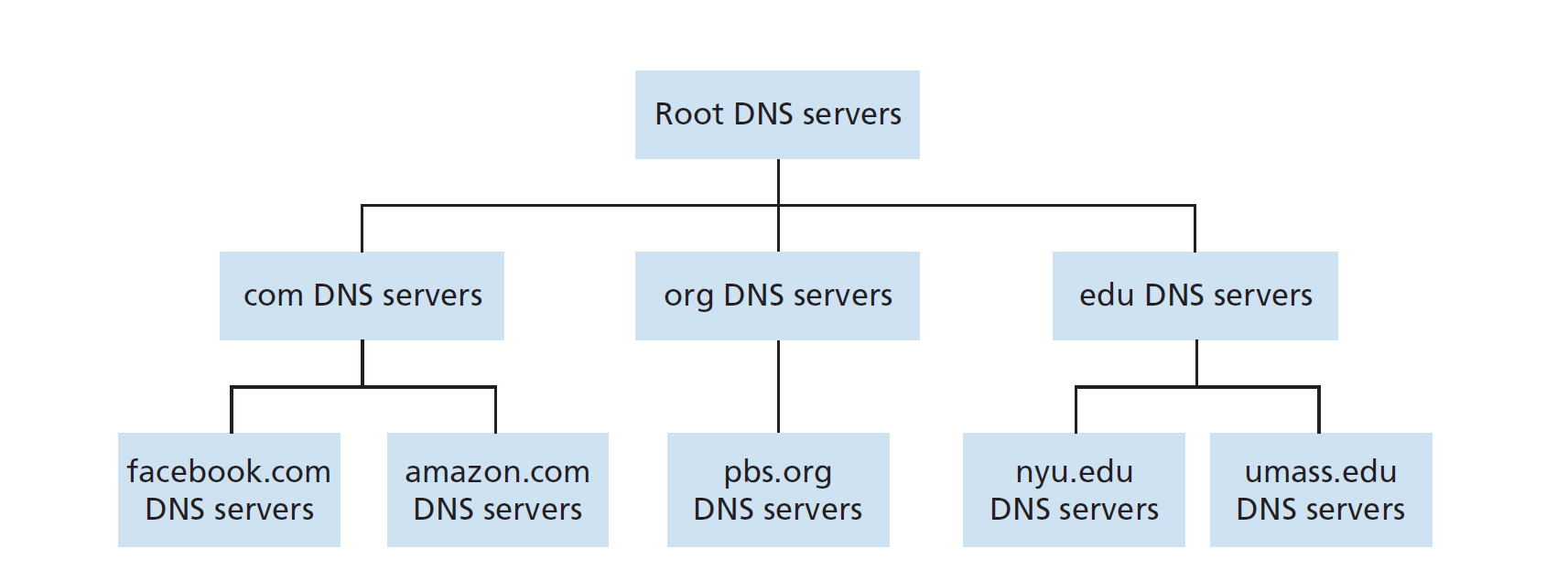
As you can see in the image above, the DNS hierarchy is structured like an inverted tree, with the root servers at the top, followed by the TLD servers, and then the authoritative servers at the bottom. The local DNS server is not part of the hierarchy but plays a crucial role in facilitating the resolution process for end-users.
DNS Resolution Process
When your browser needs an IP, it triggers a chain of messages. We will go through the two ways this can happen:
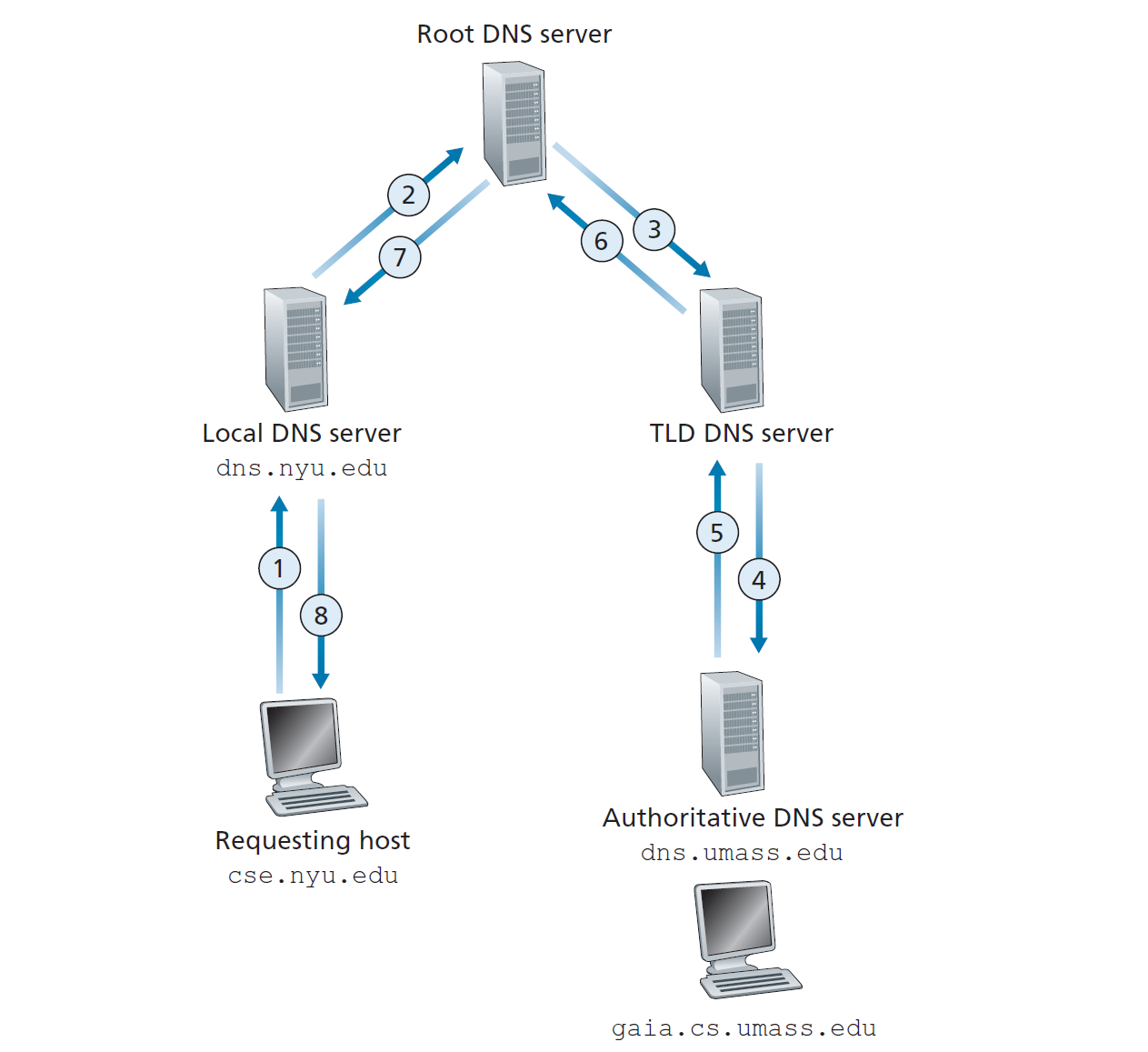
- Recursive Resolution In this method, the client says: “I don’t want to deal with this — give me the answer or an error, no referrals.” The requesting host asks the local DNS server to resolve the domain name on its behalf. The local DNS server then asks the Root servers, which ask the TLD servers, which ask the authoritative servers, and so on until it finally gets the IP address. The local DNS server then returns the IP address to the requesting host as we can see in the image below.
Note that Root and TLD servers almost always refuse recursive queries — if they had to track the state of millions of pending lookups, they would be overwhelmed instantly.
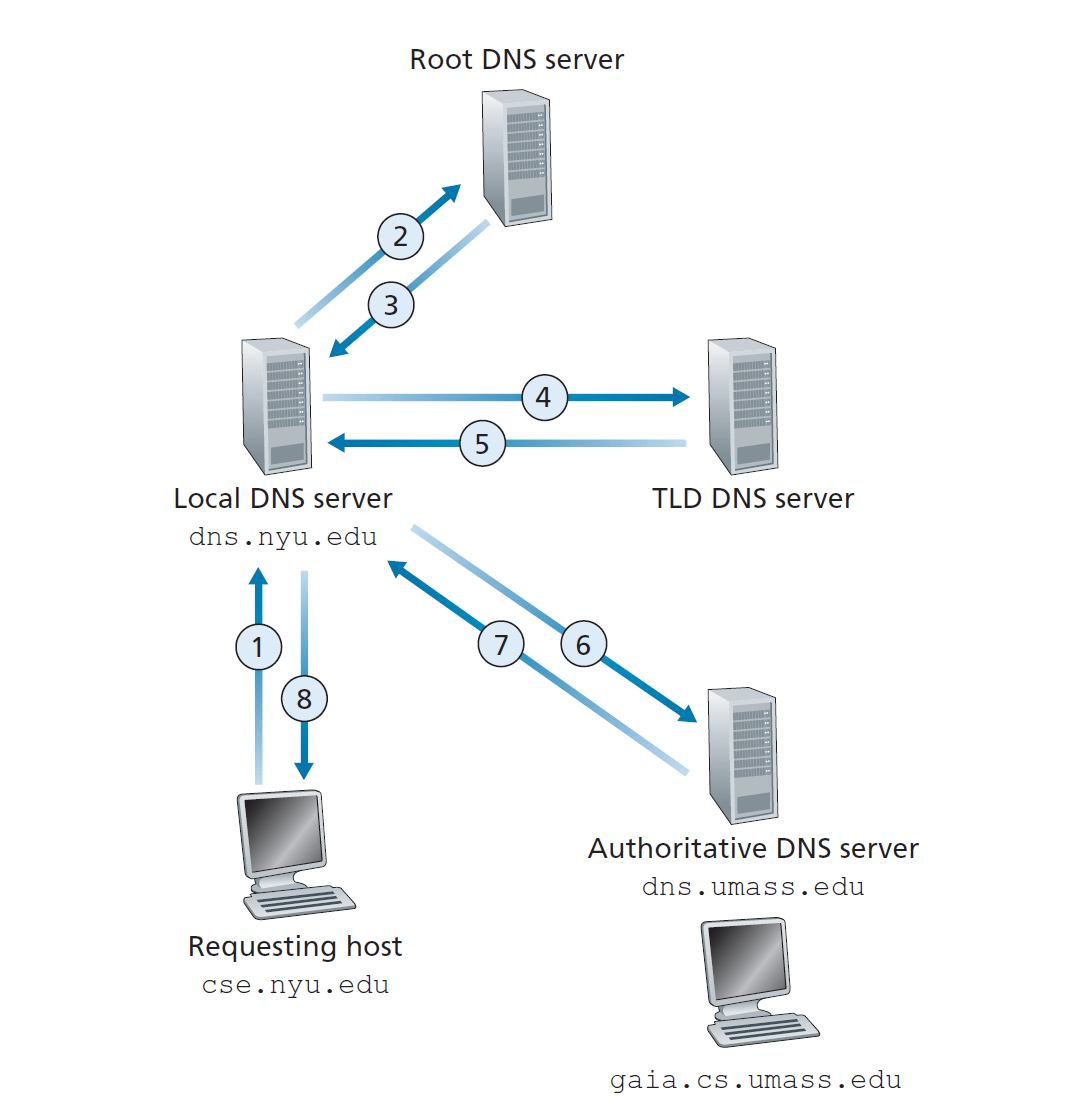
- Iterative Resolution In this method, the server says: “I don’t know the answer, but here’s who you should ask next.” The local DNS server asks the Root servers to resolve the domain name. The Root servers respond with a referral — the address of the TLD servers — and the local DNS server then queries the TLD servers directly. The TLD servers similarly return the address of the authoritative servers, and the local DNS server queries those directly, until it finally gets the IP address. The local DNS server then returns the IP address to the requesting host.
To make this concrete, here’s the full trace of what happens when you type www.google.com into your browser:
| Step | From | To | Message |
|---|---|---|---|
| 0 | Browser | OS cache | /etc/hosts | Check local cache first — if found, skip everything below |
| 1 | Client | Local DNS | “Find me www.google.com. I’ll wait.” (recursive) |
| 2 | Local DNS | Root Server | “Where is .com?” (iterative) |
| 3 | Root Server | Local DNS | “Ask the TLD server at [IP].” |
| 4 | Local DNS | .com TLD Server | “Where is google.com?” (iterative) |
| 5 | TLD Server | Local DNS | “Ask Google’s name server at [IP]. Here’s a glue record so you don’t have to ask me again.” |
| 6 | Local DNS | Google’s Authoritative Server | “What is the IP for www?” (iterative) |
| 7 | Authoritative Server | Local DNS | “It’s 142.251.152.119. TTL is 300s.” |
| 8 | Local DNS | Client | “Here you go! I’ve cached this for the next 5 minutes.” |
A subtle problem: the Glue Record
Step 5 hides an interesting chicken-and-egg problem. When the .com TLD server tells the local DNS server that Google’s authoritative server is ns1.google.com, how does the local DNS server find the IP of ns1.google.com? It would need to query google.com — but that’s exactly what it’s trying to resolve!
To break this loop, TLD servers include Glue Records — Type A records for the name servers themselves — in the Additional section of their response. So along with “ask ns1.google.com”, the TLD also hands over the IP of ns1.google.com directly, making the extra lookup unnecessary.
In practice, the two methods aren’t randomly mixed — they’re used at different levels by design. The query from your host to the local DNS server is recursive (you ask it to do all the work). But the local DNS server talks to the root, TLD, and authoritative servers iteratively (it follows the referrals itself). Root servers can’t afford to do recursive resolution for billions of queries — keeping it iterative ensures they only answer one question at a time and move on.
DNS Caching
To speed up the resolution process and reduce the load on the DNS servers, DNS responses are cached at various levels of the hierarchy. When a DNS server receives a response, it stores it in its cache for a certain period of time, known as the Time To Live (TTL). If another request for the same domain name comes in before the TTL expires, the server can return the cached response instead of querying the hierarchy again.
This caching mechanism significantly improves the performance of DNS resolution, as it reduces the number of queries that need to be made to the root and TLD servers. However, it also means that if a domain’s IP address changes, there may be a delay before the new IP address is propagated through the caches.
DNS Records
DNS records are the entries in the DNS database that map domain names to IP addresses and other information. The DNS database is actually a collection of Resource Records (RRs). Every RR is a four-tuple formatted as \(\langle \text{Name, Value, Type, TTL} \rangle\)
The meaning of Name and Value depends entirely on the Type:
Type=A: Name is the hostname, Value is the IPv4 address.
Type=NS: Name is a domain (like google.com), and Value is the hostname of the authoritative server that knows how to find IPs in that domain.
Type=CNAME: Value is the “canonical” (real) hostname for the “alias” Name. (e.g., mapping
Type=MX: Value is the canonical name of a mail server that has an alias Name. This allows a company to use the same domain (like enterprise.com) for both web and email traffic.
DNS Packet Structure
Well What does a DNS query look like on the wire?
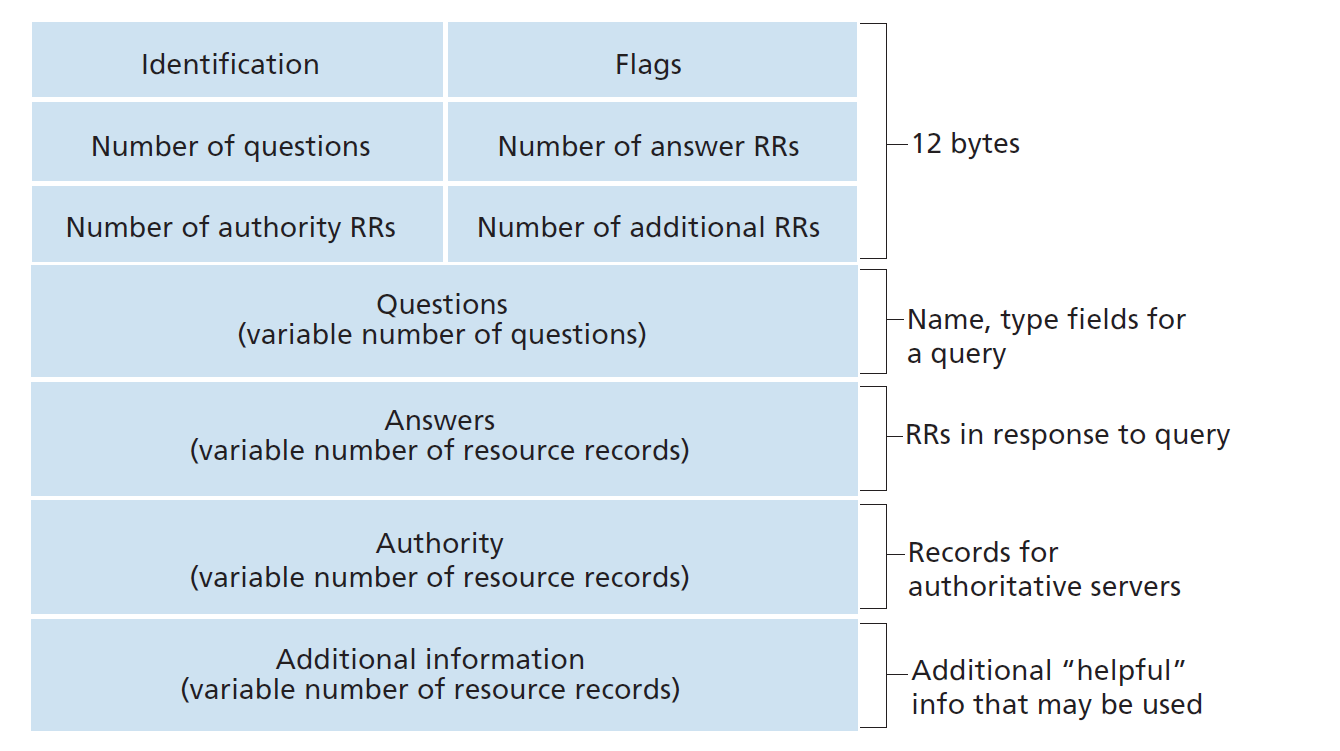
As we can see in the image above, Every DNS query and reply uses the same message format:
-
Header (12 bytes) It contains a 16-bit Identifier, allowing the client to match its original query to the server’s reply. It also holds Flags that signal if the message is a query or a response, if recursion is desired, and if the server is the “authoritative” source for that domain.
-
Question Section It contains the actual request. It includes the Query Name (like google.com) and the Query Type, which specifies if the user is looking for an IPv4 address (Type A), a mail server (Type MX), or another record. Most messages contain only one question.
-
Answer Section In a response message, this section contains the Resource Records (RRs) for the name originally queried. A single hostname can have multiple IP addresses for load balancing; if so, this section will return multiple Type A records, providing redundancy and distributing traffic across various servers.
-
Authority Section This part of the message points the requester toward other Authoritative Servers. If a server doesn’t have the final answer, it uses this section to provide the names and records of servers further down the hierarchy that are better equipped to resolve the specific domain name.
-
The Additional Section This “helpful” section contains extra records that the requester didn’t explicitly ask for but might need next. For example, if you request a mail server’s name (MX record), the DNS server will often pre-emptively include that mail server’s IP address (A record) here to prevent a second query.
DNS as a Load Balancer
Well if you think about it, DNS can also be used as a load balancer. This is because a single domain name can have multiple IP addresses associated with it. Because if google.com had only one IP address, it would be a single point of failure. So instead, google.com has multiple IP addresses associated with it, and when you query for google.com, you might get a different IP address each time. Since clients typically connect to the first IP in the list, this “DNS Rotation” distributes traffic across all replicated servers. This is pretty clever because it allows google to distribute the load across multiple servers and also provides redundancy in case one of the servers goes down.
Connecting back to the Cloudflare outage
Remember the Cloudflare outage from February 2026 that I mentioned at the start? To understand why it hit so many people at once, you need to know about Anycast routing. Root servers and major public resolvers like Cloudflare (1.1.1.1) don’t run on a single machine — hundreds of physical servers across the globe all share the same IP address. The BGP routing protocol directs your query to the geographically closest one, keeping latency low.
When Cloudflare had its outage, it was a breakdown in how these routes were being advertised. Suddenly, traffic meant for a nearby server had no valid route — and for anyone relying on 1.1.1.1 as their resolver, DNS stopped working entirely. This is why even with all the redundancy in the DNS hierarchy, a single provider’s failure can still cause widespread disruption.
Fun Fact: You might wonder why DNS usually uses UDP on Port 53. Unlike TCP, UDP doesn’t require a “handshake” before sending data, making lookups much faster. If a response is too large to fit in a standard packet, the protocol simply retries the request using TCP.
Alright, that’s all for this post. Thank you for reading till here. I hope you found it informative, and if you have any questions or suggestions, feel free to reach out to me. Hopefully I will be writing more posts in the future, so stay tuned!
References: